Chapter 6 The Tools of Transformation
3~D printers are heading for the alchemist’s dream: making anything.
“Tea. Earl Grey. Hot.”
When CaptainJean-Luc Picard wants a steaming beverage in his ready room aboard the starship Enterprise, he just utters those words.
The ship’s “replicator” then assembles the necessary atoms—including those for the cup—and produces it, ready for the drinking. Picard thinks nothing of it—it’s hardly more remarkable to him than a microwave oven is to us today. Just as we now use radio waves to excite atoms and generate heat in our own kitchens (which would have been mind-blowing in the 1950s), his replicator uses some fancy energy technology that is never quite specified in Star Trek: TheiNext Generation to get atoms to self-assemble into food and drink.That’s science fiction, but it’s actually not impossible. When you see an industrial З-D printer working today, with a little poetic license you can glimpse the beginnings of something similar. A bath of liquid resin lies inert, a primordial soup. A laser begins tracing pattens in it, like lightning. Shapes form and emerge from the nutrient bath, conjured as if by magic from nothing.
Okay, poetic license revoked—we’re still a long way from molecular self-assembly, or at least in any useful way. A З-D printer can only workwith one material at a time, and if you want to combine materials you need to have multiple print heads or switch from one to another, like the different color cartridges in your desktop inkjet printer. We can only work at a resolution of about 50 micrometers (the thickness of a fine hair), while nature works at a thousand times finer detail, of a few tens of nanometers. And there’s nothing self-assembling about the way a З-D printer works: it does all the assembling itself, with the brute force of a laser solidifying a powder or liquid resin, or melting plastic and spreading it down in a fine line.
But you get the point. We can imagine something, draw it on a computer, and a machine can make it real. We can push a button and an object will appear (eventually). As Arthur C. Clarke put it, “any sufficiently advanced technology is indistinguishable from magic.” This is getting close.
Four Desktop Factories
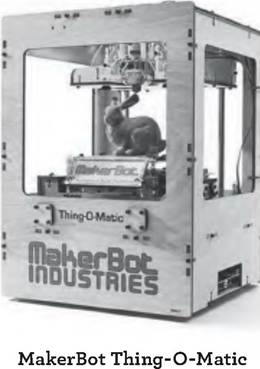
1) З-D printer. A 3^D printer and the paper printer you’ve probably already got on your desktop play similar roles. The traditional laser (or inkjet) printer is a 2-D printer: it takes pixels on a screen and turns them into dots of ink or toner on a 2-D medium, usually paper. A 3^D printer, however, takes “geometries” onscreen (3-D objects that are created with the same sort of tools that Hollywood uses to make CG movies) and turns them into objects that you can pick up and use.
Some 3^D printers extrude molten plastic in layers to make these objects, while others use a laser to harden layers of liquid or powder resin so the product emerges from a bath of the raw material. Yet others can make objects out of any material from glass, steel, and bronze to gold, titanium, or even cake frosting. You can print a flute or you can print a meal. You can even print human organs out of living cells, by squirting a fluid with suspended stem cells onto a support matrix, much as your inkjet printer squirts ink onto paper.
2) CNC machine: While a 3^D printer uses an “additive” technology to make things (it builds them up layer by layer) a CNC (“computer numerical control”) router or mill can take the same file and make similar products with a “subtractive” technology, which is a fancy way of saying that it uses a drill bit to cut a product out of a block of
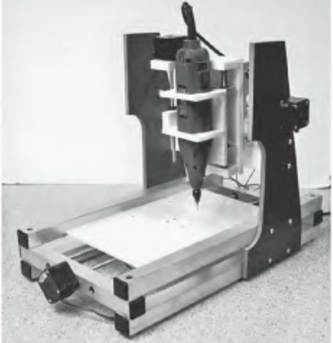
plastic, wood or metal. There MyDIYC
are countless other specialty
CNC machines: CNC quilters and embroidery machines, CNC sign and vinyl cutters (for silk-screening), and CNC paper and fabric cutters for crafters, to name a few.
Some CNC machines are the size of a large table and are designed to make furniture out of wood (industrial CNC machines can be as big as a warehouse and can carve out objects as big as an airplane fuselage).3) Laser Cutter:
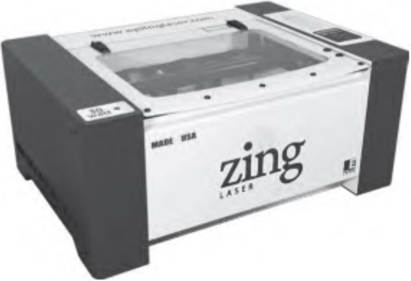
Epilog Zing laser cutter
One of the most popular of the new desktop tools is the laser cutter, which is mostly a 2-D device. It uses a powerful laser to cut a precise pattern of any complexity into sheets of whatever material you feed it, from plastics and woods to thin metal. Many CAD programs can break a 3-D object into 2-D parts so they can be fabricated with a laser cutter, and then neatly slotted together like one of those plywood dinosaur kits.
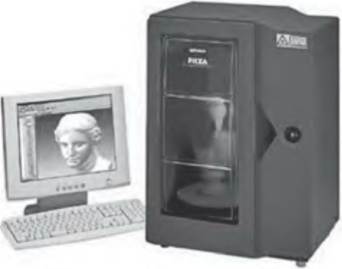
Roland Picza З-D scanner
4) 3-D Scanner: This device, which can be as small as a breadbox, allows you to do “reality capture.” Rather than having to draw an object from scratch, you can put an existing object in the scanner. It then uses lasers or other light sources and a camera to image the object from all sides, and then turns it into a
3-D image made up of tens or hundreds of thousands of polygons, just like a videogame character or CG movie set. The software can simplify it and let you modify any part you want. A common first experiment is to scan your head, then exaggerate your features and 3-D print a bobble-head of yourself.
You may think of 3-D printing as bleeding-edge technology today, the stuff of high-end design workshops and geeks. But you may have encountered a 3-D printer already, in ways so prosaic you didn’t even notice.
Take custom dental fittings, such as those that change the alignment of the teeth over months with a series of slightly different mouth guards, each of which shifts the teeth imperceptibly into a new position. In that case, a dental technician scans the current position of your teeth, then software mathematically models all the intermediate positions to the desired endpoint.
Finally, those positions are 3-D printed in plastic as a series of mouth guards that you wear, each for a two or three weeks, until your teeth are in the new position.Likewise for the prototypes of practically every gadget you’ve every bought, and the architectural models for the newer buildings around you. Custom prosthetics are 3-D printed, if you’re lucky enough to have a dentist who can replace a crown in a single sitting, that’s probably 3-D printed (then sprayed with enamel) in the office. Doctors have printed and replaced an entire human jaw from titanium.
Today, you can buy a custom 3-D printed action figure of your World of Warcraft character or your Xbox Live avatar. And if you go to Tokyo, you can have your head scanned and you can buy a photorealistic action figure of yourself (try not to get too creeped out).
Commercial 3-D printing only works with a few dozen types of materials, mostly metals and plastics of various sorts, but more are in the works. Researchers are experimenting with more-exotic materials, from wood pulp to carbon nanotubes, that give a sense of the scope of this technology. Some 3-D printers can print electrical circuits, making complex electronics from scratch. Yet others print icing onto cupcakes and extrude other liquid foods, including melted chocolate.
At the huge scale, there are already 3-D printers that can make a multistory building by “printing” concrete. Right now that requires a 3-D printer the size of the building, but it may someday be built into the cement truck itself, with a concrete that uses positional awareness to decide where to put down concrete and how much, directly reading and following the architect’s CAD plans.
Meanwhile, researchers are working just as hard at moving in the other direction: 3-D printing at the molecular scale. Today there are “bio printers” that print a layer of a patient’s own cells onto a 3-D-printed “scaffold” of inert material. Once the cells are in place, they can grow into an organ, with bladders and kidneys already demonstrated in the lab.
Print with stem cells, and the tissue will form its own blood vessels and internal structure.Today’s vision for 3-D printing is grand in ambition. Carl Bass, the CEO of Autodesk, one of the leading companies making 3-D authoring CAD software, sees the rise of computer-controlled fabrication as a transformative change on the order of the original mass production. Not only can it change the way traditional consumer goods are made, but З-D printing can also work on scales as small as biology and as large as houses and bridges.
In an essay he published in the Washington Post, Bass explained what’s so different about this way of making things:
The ability to produce a small number high quality items and sell them at reasonable prices is causing an enormous economic disruption. In it, you can see the future of American manufacturing. In a computerized manufacturing process like З-D printing, complexity and quality come at no cost.... A traditional paper printer can print a circle or a copy of the Mona Lisa with equal ease. The same rule applies to a З-D printer.24
From a design perspective, this is revolutionary. It is no longer necessary for the designer to care or know about the manufacturing process, because the computer-controlled machines figure that stuff out for themselves. The same design can be fabricated in metal, plastic, cardboard, or cake icing. (It might not be very useful in all those materials, but it would exist.) “We can separate the design of a product from its manufacture for the first time in history, because all of the information necessary to print that object is built into the design,” Bass explained.
Even better, as З-D printers proliferate and become used for small-scale bespoke or custom-made manufacturing, they can provide a more sustainable way of making things. There are little or no transportation costs, because the product is made locally. There is little or no waste, because you use no more raw material than you need.
And because the product is custom-made just for you, you’re more likely to value it and keep it longer. Personalized products are less disposable; you simply care about them more.Rich Karlgaard, the publisher of Forbes magazine, thinks that 3-D printing “could be the transformative technology of the 2015-2025 period.” He writes:
This has the potential to remake the economics of manufacturing from a large-scale industry back to an artisan model of small design shops with access to З-D printers. In other words, making stuff, real stuff, could move from being a capital intensive industry into something that looks more like art and software.
This should favor the American skill set of creativity.25
But also remember what З-D printing and any other digital production technique cannot do. They offer no economies of scale. It is no cheaper on a per-unit basis to make a thousand than one. Instead, they offer exactly the opposite advantage: there is no penalty for changing each individual unit or making just a few of a kind.
It is the reverse of mass production, which favors repetition and standardization. Instead, З-D printing favors individualization and customization. The big win of the digital manufacturing age is that we can have our choice between the two without having to fall back on expensive handcrafting: both mass and custom are now viable automated manufacturing methods.
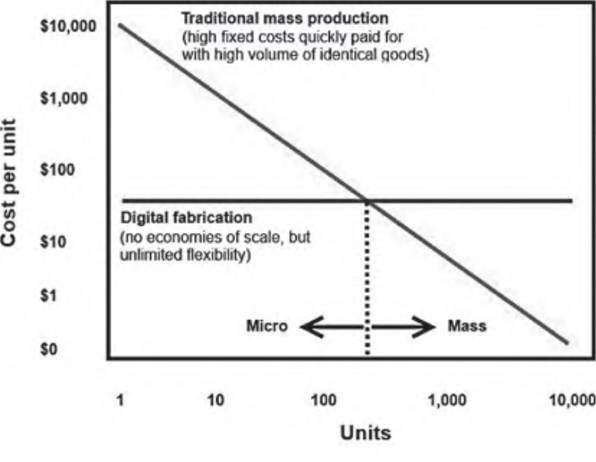
If you want to make a million rubber duckies, you can’t beat injection molding. The first ducky may cost $10,000 in tooling for a mold, but every one after that amortizes the one-off cost. By the time you’ve made a million, they cost just pennies for the raw material. Make the same thing on a З-D printer, on the other hand, and the first ducky might Costjust $20 in time and materials a huge savings. But so,
sadly, will the one millionth—there is no volume discount.
Include the amortized cost of the machine it takes to З-D print those duckies one at a time (a process that might take an hour), rather than injecting-molding them in batches of a dozen or more at less than a minute per batch, and the crossover point where it’s cheaper to go the injection-molding route comes at just a few hundred. For small batches, digital fabrication now wins. For big batches, the old analog way is still best (see diagram).
Butjust think about how many products actually make more sense in units of hundreds, not millions. For this “long tail of things,” the
88 I MAKERS
only option a few decades ago was handcrafting. But today digital fabricators can bring automated processes and near-perfect quality to the smallest batches. All those niche products that either weren’t on the market at all because they didn’t pass the economic test of mass production or were ruinously expensive because they needed to be handmade are now within reach.
Digital fabrication inverts the economics of traditional manufacturing. In mass production, most of the costs are in up-front tooling, and the more complicated the product is and the more changes you make, the more it costs. Butwith digital fabrication, it’s the reverse: the things that are expensive in traditional manufacturing become free:
1. Varietyis free: It costs no more to make every product different than to make them all the same.
2. Complexity is free: A minutely detailed product, with many fiddly little components, can be З-D printed as cheaply as a plain block of plastic. The computer doesn’t care how many calculations it has to do.
3. Flexibility is free: Changing a product after production has started just means changing the instruction code. The machines stay the same.
You don’t have to go to З-D printing to see this in action. We already have this with a small class of familiar “standardized platforms” for customization: T-shirts and other simple clothing, coffee mugs, stickers, and the like. Companies such as Threadless, CafePress, and others have created huge businesses out of offering custom printing on such products. In this case, the enabling technology is not 3-D printing, but rather just 2-D printing on complex shapes and materials; the effect, however, is the same: a thriving market in the sort of products that would never make sense in a mass-production market.
Typically, Threadless and CafePress orders are in dozens—not ones, but not thousands, either. Yet collectively, this LongTail can add up to a lot. CafePress has more than two million customers. In 2010, its revenues were $128 million and it made $15 million in profit26; it filed for a public stock market listing, which is expected to value the company in the billions of dollars.Not bad for custom-printed T-shirts and mugs.
As easy as XYZ
Let’s return to the З-D printer, this miraculous machine that has so fired the imagination of futurists and machine-shop operators alike. How does it work?
At its core, a З-D printer is just a variety of three-axis CNC machine. Two computer-controlled motors move a head left and right and forward and back (the x and у axis), while another motor moves the printer tray or the platform holding the object being printed up or down (the z axis).
If you’ve ever looked into your desktop inkjet printer while changing a cartridge, you’ll recognize many of the parts. An inkjet is a 2-D printer, which means that it only works on the x and у axis. The motor that moves the print head back and forth is just like the ones used in the 3-D printer; the inkjet just uses a roller to advance the paper along the other axis. Overall, the concept is exactly the same: a computer translates a design into motor commands and deposits a material in exactly the right place, very quickly. The 3-D printer just does same thing with more motors and squirts more than just ink.
Some 3-D printers, such as the MakerBot, squeeze melted ABS plastic out a tiny hole to lay down materials in layers, a process called fused deposition modeling (FDM). Other, higher-end machines use lasers to harden liquid resin in a bath (known as Stereolithograpy, or SLA) or harden layers of powdered plastic, metal, or ceramic, a process known as selective laser sintering (SLS)The laser-driven machines can use a wider range of materials and achieve higher resolution, but tend to be more expensive than the plastic-extruding 3-D printers, which are more commonly found in homes. In a sense, this is a bit like regular paper printers, where laser printers are mostly in offices and inkjets mostly in homes.
3-D printers are an “additive” technology, which is to say that they build up objects, layer by layer, from the bottom up. By contrast, other computer-controlled machines, such as the CNC router and CNC mill, are “subtractive”; they use a spinning tool to cut or grind away material. So an additive process deposits material where the object “is”; a subtractive process takes away material where the object “isn’t.”
With a 3-D printer, software first examines the CAD file for an object and figures out how to make it printable using the least amount of material and time. Take, for example, a bust of a human head. The external walls of the head must be printed, but their width may be arbitrary, depending on the material used; the software will calculate the best values to print as little as possible while maintaining sufficient strength.
Typically the inside of the head is not visible, so there is no need to print it. But without any interior structure, the head could be weak and brittle. So the software will typically create a honeycomb-like support matrix inside the head, to provide the maximum amount of rigidity with the minimum amount of material (when you upload an object to a З-D printing service bureau, you typically pay for the amount of material used or the time it takes the job to run on the machine).
The software then “slices” the object into horizontal layers as thin as the printer can handle. Each of those slices is a set of commands to the printer head to move in the x and у direction while it is extruding material or shining its laser on the powder or resin. As the head moves over the build area, it will trace out the entire slice of the object, with the software picking a path that minimizes the distance the head must move.
In a sense, this is the same concept as the original Postscript printer language that started the desktop publishing movement nearly thirty years ago. It’s a way of translating from a visual language that people understand (words and typefaces in desktop publishing then, З-D objects on a screen now) to a machine language that computers understand. Today the fabrication language is called “G-code.” Just as Postscript was originally intended to drive huge industrial printers but has now found its way to the desktop, G-code was designed for machine shops but is now used in basements.
Once the З-D printer has finished one slice, the G-code commands the z motor to move the head up a tiny fraction of an inch, and the head traces the next slice, laying down another layer of material. And so it goes, layer by layer, all the way up the object until it is finished.
In some З-D printers, such as those that harden liquid resin, the object actually moves down into the bath as it is fabricated, so that a new layer of liquid can flow on top of the previous layer, to be hardened by the laser. This can work on resolution as small as a few dozen nanometers, allowing the printing of structures as small as a human cell. Yet others use layers of very thin plastic sheet, with glue between each layer, and the printer head cuts out the shape in each layer. But the basic concept is always the same: build up an object in slices as thin as is physically possible. In a high-quality printer, these are practically invisible.
One of the advantages of the 3-D printer that uses a laser to harden powder is that the unhardened powder, which is still densely packed in the tray, can serve as a structural support for overhanging parts of the object, which can be droopy until they cool. When the project is done, operators take the part out and brush away the excess powder. It’s possible to do the same thing with a 3-D printer that extrudes molten plastic, but only with a second head, which deposits a layer of powder or other disposable material where a pillar must go to support some overhanging ledge at a higher layer.
All these manufacturing calculations sound very fiddly, but it all happens automatically; indeed, it’s almost magical to watch. That’s the beauty of digital fabrication; you don’t need to know how the machines do their work, or how to optimize their toolpaths. Software figures all that out. The CAD design of the object contains all the information the 3-D printer needs to figure out how to make it.
The Homebrew Printing Club
This all started in industrial tooling companies in the 1980s, but over the past decade the technology has spread to regular folk, just as the PC did. To see how, take the subway to an otherwise undistinguished part of Third Avenue in Brooklyn, and knock on the metal door with the big mobile-phone readable QR code on it. Wait for some stylishly disheveled young man to open it and let you in.
Welcome to the Botcave.
In this converted brewery, Bre Pettis, Zach Smith, and their team of hardware engineers at MakerBot Industries are making the first mainstream $1,000 3-D printer. Rather than using a laser, the Mak- erBot Thing-O-Matic printer builds up objects by squeezing out a 0.33-mm-thick thread of melted ABS plastic, which comes in multicolored reels.
Where industrial З-D printers tend to look like medical equipment, MakerBots tend to be personalized, decorated with dayglow letters and showered with parental love by their owners.The one I made is black with orange lettering and blue LEDs. It looks really cool when it’s running in a dark room.
Out of the box, the MakerBot is a regular З-D printer: it produces plastic parts from digital files. Want a certain gear right now? Download a design and print it out yourself. Want to modify an object you already have? Scan it, tweak the parts you want to change with the free SketchUp software from Google, and load it into the Replica- torG app. Within minutes, you have a whole new physical object: a rip, mix, and burn of atoms.
The MakerBot is one of the simplest З-D printers. It has just four motors: the x, y, and z, along with a fourth motor to drive the ABS plastic filment through a heater to melt it and then on the build platform to make the object. The frame of a MakerBot is laser-cut plywood, and some of its plastic pulleys are actually made by other MakerBots themselves. The electronics are based on the Arduino processor board.
There are way more blinking LEDs than are necessary. If you have to ask why, you’re missing the point. MakerBot is not just a tool. It’s also a plaything. It’s a revolutionary act. It’s a kinetic sculpture. It’s a political statement. It’s thrillingly cool.
I’ll bet you can’t say that about your desktop inkjet.
This is the difference between commercial industrial tools and the products of the DIY movement. The Maker gear is as much about its process of creation as it is about the product itself.The fact that a MakerBot was designed by a community, manufactured by people whose name you know and whose vision you admire, and infused with personality is what makes it special. Buy one and you’re not just buying a printer—you’re buying a front-row seat to a cultural transformation. Open source is not just an efficient innovation method—it’s a belief system as powerful as democracy or capitalism for its adherents.
The philosophy in a MakerBot goes deep. It’s built on several previous open source projects including the RepRap З-D printer (a clever but more spindly design), the Arduino microprocessor board and a series of software packages that turn CAD files into instructions for the three motors that control a З-D printer’s motors. In this case, open source means open everything: electronics, software, physical design, documentation, even the logo. Practically everything about the MakerBot was either developed by a community or given to one to do with as they please. It is a shining example of how abandoning intellectual property protection can actually grant even more protection in the form of community support and goodwill.
I first visited the Botcave in 2009, a few months after MakerBot got started. In the long brick-walled room, one hundred boxes containing the ninth batch of MakerBots were lined up and gradually being filled up with kit parts. (As a customer, I was thrilled to know that one of them—serial number 400—was coming to me. It’s gotten a lot of use since then.) Racks of components were lined up for the next batch, and laser cutters were humming their way through stacks of thin plywood for the frames.
The creators were learning the realities of supply-chain management the hard way—those boxes couldn’t go out until the last parts were in them, but some components hadn’t arrived in time and others had arrived defective. A MakerBot has hundreds of parts, and if just one of them is missing, it can’t ship.
The alternative to what I was seeing—scores of boxes waiting for weeks to be completed—is to over-order everything to ensure that there all components are always in stock. That’s an expensive form of insurance; at the time I was there, MakerBot already had nearly $300,000 of parts inventory, and were still out of stock on key parts. That sort of dead capital locked up in in component inventory is painful, especially for a startup. So, after focusing so hard on research and development, the team was turning to the more prosaic, but equally important, matter of securing reliable supplies of parts and forecasting demand. That’s something anyone who has been in manufacturing in the past century would recognize, but it was new to this team of open-source hardware hackers. Revolutions don’t come from the establishment.
As I write this, more than 5,200 MakerBots have been sold (more than $5 million worth), and with every one, the community comes up with new uses and new tools to make them even better. For example, the latest head delivers a resolution of 0.2 mm. Another head can hold a rotating cutter, turning the printer into a CNC router. Others have been scaled up to make objects twice as large as originally designed.
To date, MakerBot has raised $10 million from investors, including Amazon founder Jeff Bezos, to fund its expansion. It will need all that and more—it is competing with a host of other low-cost 3-D printer makers, including Chinese ones. What is now designed to be a kit (although you can buy it preassembled), will soon be mass- manufactured and available even more cheaply, both by MakerBot and others. All the steps in using it will become easier. The market will grow from the first 5,000 to the next 50,000, from the technically sophisticated early adopters to people who just want to print something cool.
Meanwhile, the huge printer companies such as Hewlett-Packard are hovering in the wings. Right now they’re just selling expensive З-D printers to commercial customers. But at some point, probably in the next few years, the market will be ready for a mainstream 3-D printer sold in the millions in Wal-mart and Costco. At that point, the incredible economies of scale that an HP or Epson can bring to bear will kick in. A 3-D printer will cost $99 and everyone will have one.
The gateway drug
3-D printers are appropriately mind-blowing, but while they evolve their way to eventually becoming proper matter compilers, the real workhorse of the Maker movement is the humble laser cutter. Go into any makerspace, and the row of laser cutters are the ones working all day, with a line waiting to use them. They’re the digital tool everyone uses first, in part because they’re so simple and foolproof. Makers call them the “gateway drug” to digital fabrication.
Like all the digital manufacturing tools, a laser cutter is another kind of CNC machine. In this case, the computer drives motors that move a high-powered laser around an xy plane. The laser can either burn a thin line though a sheet of material (anything from plywood and plastic to thin metal) or, by varying its intensity, burn partly through it, in a form of etching.
What makes laser cutters so popular is that they’re easy to use. Rather than designing an object in З-D, you can just create an image in a 2-D drawing program such as Adobe Illustrator. Anyone can draw in 2-D—it’s what we do on paper. And if you can draw it, the laser cutter can cut it out for you. It’s perfect for the kind of thing you might otherwise use a jigsaw for. They’re fast, cheap and quiet—the ideal starter prototyping tool.
But just because a laser cutter works in two dimensions doesn’t mean it can’t make З-D objects. Special software packages can take a З-D object and break it out into 2-D planes, which can be cut separately, even adding little tab-and-slot elements so that they can fit together, making a strong and easy to assemble kit. If you’ve ever seen one of those wooden dinosaur skeleton kits, you’ve seen the work of a laser cutter.
Dozens of service bureaus, such as Ponoko or Pololu, will let you upload your 2-D file, automatically check it for errors, and help you pick an appropriate material to cut. All the parts you can fit on a plywood or plastic sheet a foot square might cost fifteen dollars. A week later your parts will arrive at your door.
If you want to cut something thicker, bigger, or less flat, you’ll need a CNC router or milling machine. These are just like З-D printers in that they operate on the x,y, and z axis, but rather than depositing material, they cut it away. Unlike a laser cutter, CNC routers can cut precise depths, too, so you can create a true З-D object in one pass. More sophisticated “five-axis” industrial versions can twist and rotate the cutting head like a human hand to cut in from side angles and
otherwise carve metal like the most skilled sculptor, but operating at superhuman speed.
I’ve got a desktop version called MyDIYCNC that costs $500 and uses a cheap handheld Dremel tool as its cutting head. We use it for carving desktop wargame model landscapes out of Styrofoam with the kids. We got the idea from one entrepreneur who will take your favorite videogame “map” and turn it into a scale tabletop surface under glass (The ones from the Halo series are particularly popular). It’s not something we do often, but it’s appropriately educational for the kids. And we can even swap a laser for the Dremel tool, and it can act like a laser cutter.
If you’ve recently had a cabinet maker redo your kitchen, odds are they used a bigger CNC router called a ShopBot. If you’ve bought flat-packed IKEA furniture, that was CNC’d at the factory. Your car was probably prototyped with a room-sized CNC machine, which carved the body shape out of foam. And even bigger, warehouse-sized CNC machines can carve an entire airplane fuselage out of foam, which will serve as a mold for a fiberglass body.
Reality capture
All these digital tools are ways to turn bits into atoms. But how about the reverse: turning atoms into bits? It’s hard to draw З-D objects from scratch on a screen; much easier is to just start with something that already exists and is similar to what you want, and then modify it.
This process is called reality capture. The idea is that you can take any object (for some reason, people always seem to start with their own heads) and scan it, creating a “point cloud” of dots that define its surface. Then other software turns that cloud of points into a mesh of polygons, just like the “wireframes” that make up the characters in computer-animated films, which can be manipulated and modified on screen.
You can buy a commercial З-D scanner that can do this with lasers that trace over an object and cameras that capture the positions of points on its surface, but there are cheaper ways, too. Autodesk offers a free online service called 123D Catch that allows you to upload regular photographs of an object (taken from all angles) and cloud-based software will turn it into a 3-D object that you can modify and print on a 3-D printer. There’s even a version that runs on the iPad.
Or you can make your own 3-D scanner with a pocket projector shining a grid pattern (“structured light”) on an object, which is viewed with a high-definition webcam. Rotate the object and the webcam will capture all the sides and dimensions, extracting geometries from the way that a known light pattern is distorted when projected on the surface of the object.
Finally, there are research projects to do this with the webcam built right into your laptop or smartphone. Software running on your PC can guide you into rotating and showing different sides of the object, filling in the missing pieces in the software’s internal model of it. This sort of “guided scanning” can mean that someday if you want to duplicate an object, you need only point your phone at it, following the phone’s directions to move around the object and zoom in on sections, and press “print.” A duplicate, perhaps even in color, will appear in your desktop 3-D printer.
At that point the possibilities become clear. We can photocopy reality, or at least as closely as a Hollywood prop. And the resolution will only improve. Low-fidelity will become high-fidelity. The next step will be to go more than skin deep, duplicating not just form but also function. We can already make the cup for the Earl Grey tea. How much longer until we can make the tea, too?
The replicator awaits.
More on the topic Chapter 6 The Tools of Transformation:
- The transformation of warfare in the Bronze Age was perhaps the most profound transformation in human history.
- Transformation (Specification)
- Oetzel John, Ting-Toomey Stella. The SAGE Handbook of Conflict Communication: Integrating Theory, Research and Practice. SAGE Publications,2013. — 912 p., 2013