Case Study: Uruk 3000 B.C
In order to highlight the key aspects of our approach, we have applied it to simulating one of the humanity’s first cities—the city of Uruk 3000 B.C. To further address the agility of our approach, we apply our methodology first to Second Life,[10] a well known virtual world platform, and then to Unity 3D,[11] the popular game engine.
The Second Life simulation, serves to present the life of Uruk to wide public, using well- know virtual world platform with many existing users. The drawback of Second Life is in its lacking capability of handling large societies of intelligent agents (or non- playable characters, NPCs). On the other hand, Unity 3D facilitates the creation of sophisticated single-user and multi-user 3D games, and also provides the possibility to execute large societies. The size of the society is bounded only by the computational capability of the hardware, on which the game is executed. In this section, we describe how our methodology facilitates deployment of sophisticated historical simulation to both platforms and estimate and compare their work load estimates.14.4.1 Preparation: Designing the World
Before we can apply our methodology, we need to design the 3D environment of the simulation. In Second Life, we started with an existing 3D model of the city that included key buildings, plants, animals and terrain. This model was developed by archaeologists and provides some level of historical exactness. For Unity 3D, we have recreated this 3D model in Google Sketchup and Blender. Furthermore, we have modelled historical objects used by various crafts belonging to the epoch. These objects include beds positioned on roofs, various chairs and tables, pots for cooking, market equipment, pottery ring, spears, and spare spear parts, fisherman boats and rows. 3D design requires a lot of effort, and the preparation step took significantly longer then design and execution of the city population.
Figure 14.7 portraits the 3D design of the market, executed in Unity 3D, with several, custom designed objects. Figures 14.8 and 14.9 compare the visualisations in both, Second Life and Unity 3D.With the static 3D design of the environment in place, we can start applying our methodology an populate this environment with autonomous agents.
14.4.2 Step 1: Design the Base Population
When defining the base population is Second Life, we considered only one ethnic group of Uruk citizens. Therefore, we designed only two members of the base population portrayed in Fig. 14.10a, b, using which we have generated the rest of the population.
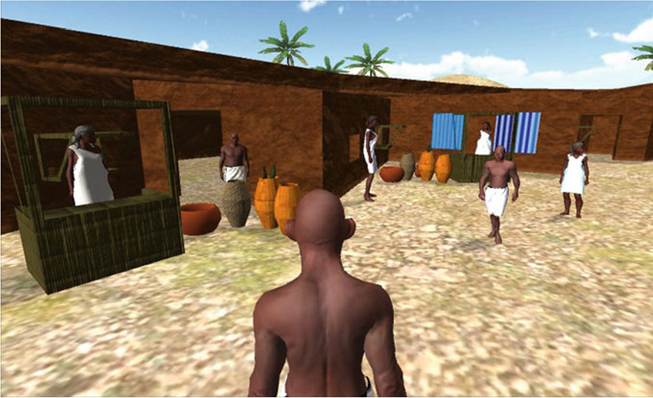
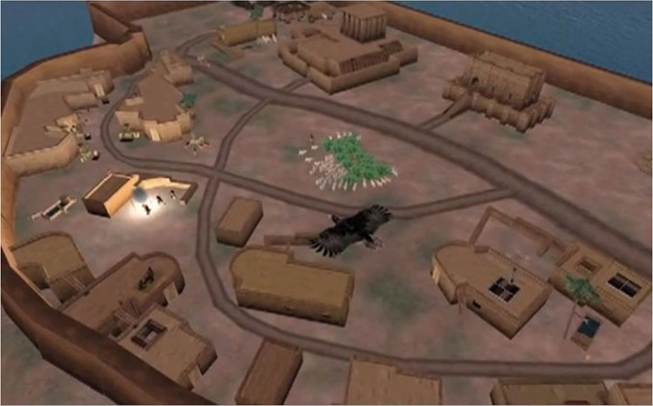
Fig. 14.8 Second Life
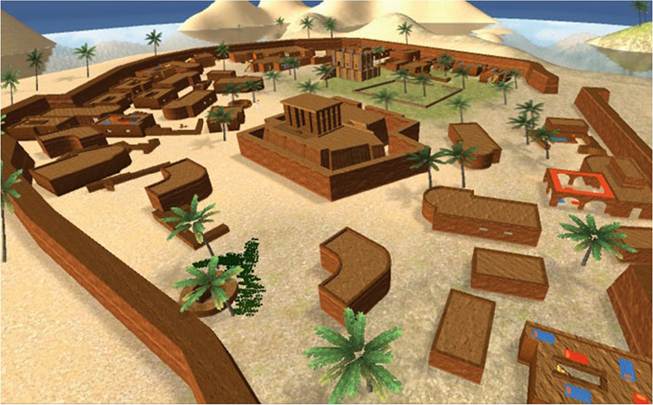
Fig. 14.9 Unity 3D
Figure 14.10c, depicts a child generated without mutation. This child clearly carries visual traits from both parents, having mother’s nose, but father’s mouth. Figure 14.10d depicts the child of the same parents, but with high level of mutation. Clearly, some visual traits are still visible (e.g. nose, jaw shape), yet, there are new emergent visual features, such as skin colour.
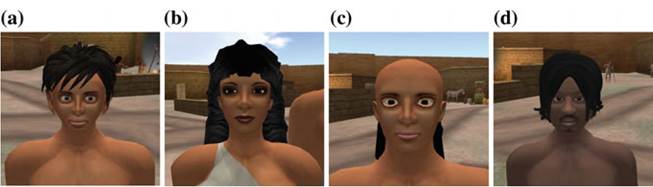
Fig. 14.10 Generating crowd appearance in Second Life. a Father. b Mother. c Child. d Mutant
In Unity 3D, we have applied a bit different approach and we have generated the base population using the genotype rules (Trescak et al. 2012). Using such rules we can specify a racial or ethnic profile, which limits gene values only to the specific range. For example, we can specify what shades of skin colour can be used, what is the approximate size of the nose, what is the range of person height and so on. Yet, this approach can only generate avatars belonging to the same race/ethnic and does not allow us to generate intra ethnic avatars.
Since we are generating avatars belonging to the ancient Uruk ethnic, this is not a problem.To modify and visualise avatars in Unity 3D, we used the open source Unity Multipurpose Avatars[12] technology for generating random avatars. We have extended the default randomisation mechanism that has only limited control over generated avatars, with our genetic approach allowing to generate avatars belonging to a specific ethnic.
Figure 14.11 depicts the sample of ten avatars generated from the initial population of five avatars. In the base population we have two ethnics, Caucasian (Adam and Bea) and Sumerian (Cyril, Diana and Eva). We have used western names for the sumerian population only for convenience, in order to code them alphabetically by the first letter in their name (A-E). Generated children are named by coded names of their parents, the crossover operator and the mutation level used during generation process. To portrait the preservation of ethnic features we have designed all members of sumerian population with bigger, distinctive noses and darker skin colour, while caucasian population has smaller noses and and lighter skin colour. Child of C + D in the first row and C + E in the second row obviously carry on only the sumerian features, although C + D shows also very distinct features, due to the high level of mutation that has been used. Interesting result is in the second row, where we depict four different children of A + E, each of them visually distinct, yet clearly carrying features from both father and mother. Two children are quite small, with lighter skin or bigger ears as their father, others are taller, or with darker skin and smaller ears as their mother.

Adam (A) Bea (B) Cyril (C) Diana (D) Eva (E)

A+B [Fuzzy, M: 30%) A+B [Fuzzy, M: 096] A+D [Fuzzy, M: 10% B+C [Exchange, M: 10%) C+D [Fuzzy, M: 50%)

A+E [Fuzzy, M: 1596] A+E [Exchange, M: 45%) A+E [Fuzzy, M: 25%) A+E [Fuzzy, M: 35%) C+E (Fuzzy, M: 35%)
Fig.
14.11 Detail of the crowd generated for Unity 3D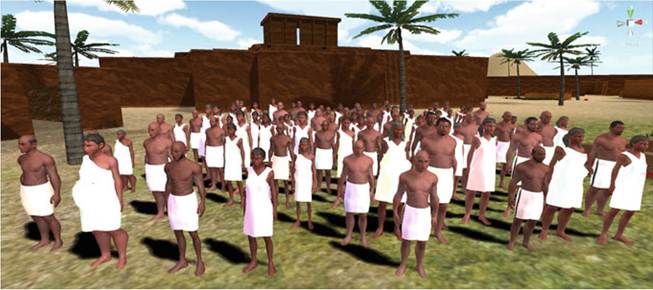
Fig. 14.12 Overview of the crowd generated for Unity 3D
Figure 14.12 depicts the society of 150 avatars, generated from base population belonging to the same ethnic. As a result, none of the generated avatars carries caucasian traits and skin colour. The apparent difference is the overall graphic quality, which is prevailing in Unity 3D.
14.4.3 Step 2: Configure Motivational Modifiers
Base population serves not only to generate avatars with unique appearance, but also with a unique (or non-uniform) behaviour. As a result, in the next step, we defined the physiological modifiers of the base population. We set various decay rates for hunger, thirst, fatigue and comfort for each member of the population. Avatars generated from the base population will obtain varied and mutated values of these modifiers. Since each modifier will have a different value, avatars will become hungry or tired in distinct intervals, executing their actions non-uniformly. Figure 14.13 shows the graphical user interface, that facilitates the specification of physiological properties.
14.4.4 Step 3: Specify Personality Traits
Physiological motivation solves the (when) problem of uniformity, when agents execute their actions at various time frames. On the other hand, having avatars with distinct personalities solves the (what) problem of uniqueness, when agents perform actions matching behavioural profile. As a result, we define personalities for each agent using the OCEAN model. Figure 14.14 shows the graphical user interface, that facilitates the specification of personality properties. In Sect. 14.6 we describe the setups for personalities that were used.
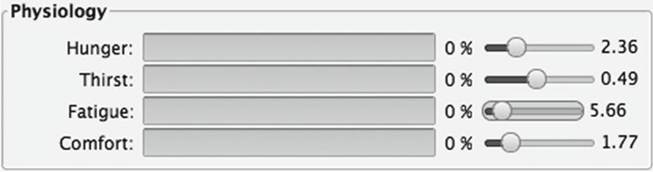
Fig. 14.13 User interface for the definition of physiological properties of an avatar
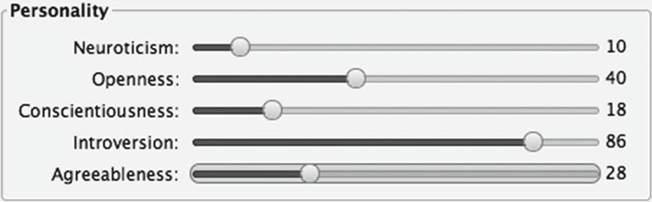
Fig.
14.14 User interface for the definition of personality properties of an avatarApart from the definition of agent personalities, we annotated all actions and relate them to a specific personality, using personality facets (see Sect. 14.3.3). Table 14.1 shows four actions that Uruk agents perform to satisfy the goal of “eating”. In this table, there are four actions, i.e. beg, work, search and steal, and nine personality facets, e.g. temptation, gregariousness, assertivity with valued ranging from -1 (low) to 1 (high). These facets work as modifiers used to calculate utility of a given action in relation to a specific personality. The higher the utility, the more probable is that the action will be selected. “Stealing” action is defined for agents with more aggressive personalities (very low correctness, low altruism), “begging” for agents with low-confidence (very low assertivity, higher correctness) and “working” and “searching” for more neutral personalities with varying sense of correctness. It is probable, that we will have to adjust these values later on, but for now it sufficed.
14.4.5 Step 4: Formalise Social Norms and Roles
Next, we defined all components of the Electronic Institution, with roles of fisherman, spear-maker, pot-maker, pries, king and wife (see Fig. 14.3). All of these roles are sub-roles of citizen, which holds all common properties for all roles, e.g. inventory of owned items.
Then, we defined possible actions of agents in specific scene protocols. For current roles we defined pray, eat, make spear, make pot, trade and fish protocol (Fig. 14.15). Make spear, make pot and fish protocol belong to the scene “Work”, and
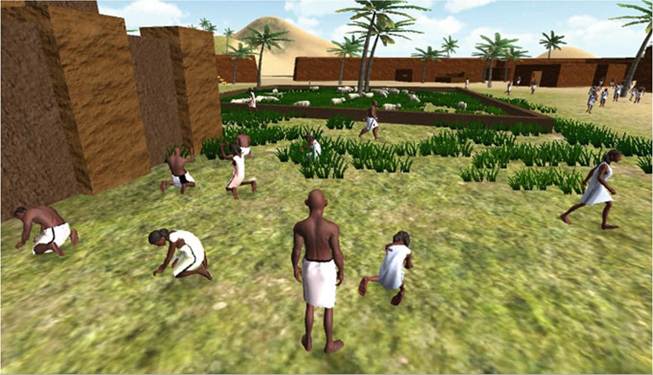
Fig. 14.15 Working on the land
agents select the correct protocol based on their role. Most of these protocols only command a single agent what actions need to be performed to achieve its goal. The exception is the fishing protocol, which defines collaborative actions for two agents, where one agent has to row a boat, while the other is fishing.
Therefore, fisherman always have to agree to go fishing in pairs.Finally, we grouped scene protocols in a performative structure (see Fig. 14.4), which restricts execution of actions in scenes to specific roles.
14.4.6 Step 5: Adaptation and Annotation of the Environment
For all actions and interactions, we have recorded animations, such as begging or stealing food, using motion capture and copied them in “.BHV” format to Second Life and with the help of Blender 3D, we have converted “.BVH” file to Unity 3D. Recording animations and their subsequent processing in any platform is a very delicate task and usually requires professional crew and equipment. Since we had no such possibility our own acting performance sufficed.
Moreover, since 3D object carry no meta-information on their possible purpose, we have added related objects to the virtual world model and annotated the environment so that agents can use them in their planning. For example, agents use the 3D object camp fire to cook their food. Therefore, we annotate that this 3D object provides action (illocution) “cook” from the scene “Eat” (annotated as action:Eat.cook). As a result, when agent plans its action, it knows that it has to interact with camp fire object to perform the “Eat.cook” action. In another example, we annotated the a pottery ring with “action:Work.PotMaker.makePot”, what defines that pottery ring provides action makePot in the scene protocol “PotMaker” from the scene “Work”.
14.4.7 Step 6: Generating the Population
In the last step, we generated a population of agents and connected these to Second Life. Each agent had a unique appearance and automatically started fulfilling its goals. Agents were correctly selecting their goals based on their physiology, executing them at various intervals due to different physiological modifiers, planing their actions based on their personality and social norms, and executing them in the simulated environment. Figure 14.16 shows some virtual agents from the resulting simulation.
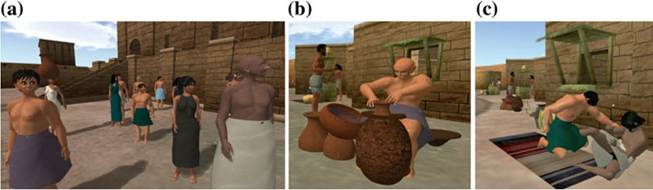
Fig. 14.16 Everyday life in the city of Uruk 3000 B.C. a Crwod. b Working. c Stealing
14.5
More on the topic Case Study: Uruk 3000 B.C:
- Case Study: Darug Clan, Australia
- Case study
- Case study contributors
- The First Farmers: A Case Study
- A Case Study of Solomon islands
- A Case Study of the Idu Mishmi
- “Killer Algae!”: A Case Study
- Enslaver Parasites: A Case Study
- A Sea in Trouble: A Case Study
- Nemo Grows Up: A Case Study
- Toolmaking Crows: A Case Study
- Frozen Frogs: A Case Study
- A Fragile Crust: A Case Study
- Snowshoe Hare Cycles: A Case Study